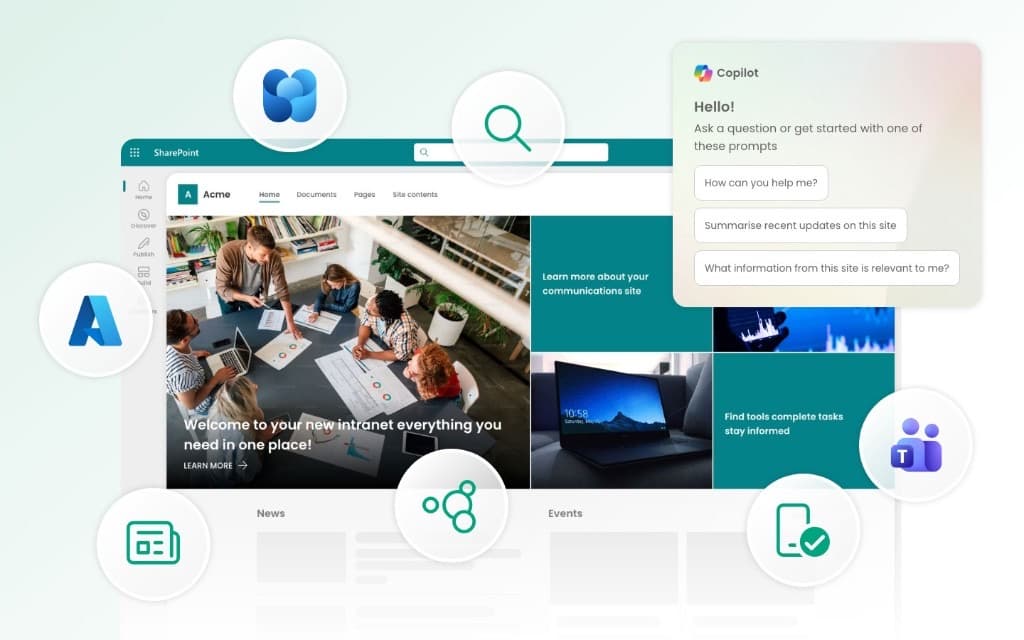
If you search "SharePoint intranet" right now, you'll get two kinds of results: Microsoft marketing telling you SharePoint can do everything, and competitors telling you it can't do anything without their product. Neither is particularly helpful for the intranet teams having to make decisions about how their SharePoint intranet should be structured and implemented.
In this guide we have tried to distill all that we know from delivering hundreds of projects across organisations of every size to answer the key question: is native SharePoint enough to deliver genuinely strong intranet foundations, or does it require additional software to deliver an intranet that will be successful?
The answer is "it depends". SharePoint is a genuinely strong foundation for intranets but that does not mean it is a finished, polished intranet. This article explores what that actually means in 2026.
In summary: A SharePoint intranet is a company intranet built on Microsoft SharePoint Online, part of Microsoft 365. It is the most widely used intranet platform in the world, with over 200,000 organisations and 190 million people relying on it. SharePoint provides strong foundations including communication sites, hub sites, search, Teams integration and built-in security, but depending on your size and ambitions, you may find native SharePoint alone doesn't stretch far enough in areas like news targeting, content governance and personalisation. In 2026, the arrival of AI in SharePoint and Microsoft 365 Copilot has made intranet content quality and governance more important than ever. Most mid-market organisations get the best results by combining SharePoint with an in-a-box product that extends the native experience without adding complexity.
What is a SharePoint intranet?
A SharePoint intranet is an internal company website built on Microsoft SharePoint Online, the cloud-based content and collaboration platform included in every Microsoft 365 business and enterprise subscription.
SharePoint has been around for 25 years. It is highly mature, and for many years has been the dominant intranet platform globally, used by over 200,000 organisations and widely adopted across the Fortune 500.
For most organisations already paying for Microsoft 365, SharePoint Online is the natural starting point for an intranet because it's already included in the subscription. There's no separate platform to buy, no additional SSO to configure, and all content lives inside your existing Microsoft 365 tenant.
But many organisations that come to us with an intranet that has just been running on SharePoint Online come to us with problems:
- It has been difficult to establish controls to ensure intranet content is up to date, and is not filling up search with "noise"
- Internal comms aren't happy because they cannot deliver engaging news and updates, and work out what is working
- There are some key gaps in the everyday experience and people keep on making requests for features that SharePoint can't deliver
- The organisation has outgrown SharePoint, and it is not good enough for the next stage of growth
If you have fewer than 100 employees and fairly straightforward needs, native SharePoint is probably enough, and you can stop reading here. For everyone else, the real question is what you need to build on top of it to meet all your needs.
SharePoint is a highly flexible platform. It is not a finished intranet. That's actually a strength, because it means you can build an intranet that meets your requirements, and that people want to use to get things done and stay informed every day.
So what does a finished intranet look like? SharePoint gives you the foundation. The difference is in what gets built on top. Browse real branded SharePoint intranet designs, from single-site launches to global rollouts. See SharePoint intranet designs →
What do you get out of the box?
SharePoint Online comes with a solid set of intranet building blocks:
- Communication sites: This is the core site type for publishing news, landing pages, and company-wide content. The modern page editor is genuinely good now and content editors can build attractive, responsive pages without touching code, which wasn't the case even a few years ago.
- Hub sites: A way to organise and connect multiple sites under shared navigation and branding. This is how you build a structured information architecture without the deep subsite trees that made classic SharePoint intranets a nightmare to manage. See SharePoint intranet templates.
- News and news feeds: The ability to publish news posts, target them to audiences using Entra ID groups, and surface them across multiple sites or through Viva Connections. It works, though as we'll cover below, it has limits that internal comms teams tend to hit quickly.
- Microsoft Search: Enterprise search across SharePoint, OneDrive, Teams, and other Microsoft 365 content. Powered by Microsoft Graph, with AI-enhanced results in Copilot-enabled tenants. On paper this is excellent. In practice, it's only as good as your content governance, information architecture and metadata, which is where many intranets quietly fall down.
- Viva Connections: This brings your intranet directly into Microsoft Teams with a personalised dashboard, news feed, and resources. For many employees this is now the primary entry point, which means your intranet experience inside Teams matters as much as the browser version. Note that Microsoft just changed the name of the Viva Connections app in Teams to the SharePoint app in Teams, just to be super confusing.
- Integration with other 365 tools: The ability to integrate SharePoint with other 365 tools including Viva Engage, Forms and Power Platform that can bring social collaboration, workflow and more into the intranet estate.
- Security and compliance: Entra ID (formerly Azure AD) single sign-on, conditional access, and Microsoft Purview for sensitivity labels, basic data loss prevention, and retention policies. These core features are available from E3 up; more advanced compliance capabilities (eDiscovery Premium, Insider Risk Management, Communication Compliance) require E5 or the Purview Suite add-on.
- Mobile access: Responsive pages that work across devices in the browser, plus the SharePoint mobile app and Viva Connections in Teams mobile.
- Over 50 native web parts: A variety of different elements and features that make up every page including Hero, News, Quick Links, People, Events, Highlighted Content, and many more. See 15 must-have SharePoint web parts.
For some intranets these features will be enough to launch. If you're a smaller organisation with straightforward needs, native SharePoint may genuinely be all you need. But teams that want better targeting, smarter navigation, more personalised experiences, and stronger findability will find that native SharePoint can feel thin.
Where does native SharePoint fall short for intranets?
SharePoint is a genuinely excellent platform, and it gets better with every update cycle. But it's designed to do a lot of things, and intranet functionality is just one part of a much larger product. If you're a growing organisation with an active internal comms team, these are the areas where you're most likely to want more than what ships natively:
- Weak content governance: There's no built-in way to track content freshness, flag pages that haven't been reviewed, or enforce content ownership at scale. Content sprawl is the single biggest reason intranets deteriorate over time. See governance and site provisioning.
- Findability takes work: Across our projects, one of the most common things we hear is that employees struggle to find the right document, page, or person quickly. The lack of content governance, already highlighted, is a major cause of this, but there are other factors. Microsoft Search has improved significantly and is a powerful search engine, but without thoughtful information architecture and metadata, search results can still feel noisy and unhelpful. See how Baringa fixed findability across regions.
- Basic news and communications: You can publish and target news, but native SharePoint lacks advanced news features like configurable carousels, mandatory reads, alert banners, or reading receipts that internal communications teams typically need. See advanced news targeting and mandatory reads.
- Personalisation is limited: This is one of the most consistent themes in our client conversations. Audience targeting covers basic scenarios, but if you want a genuinely curated homepage experience including personalised apps, role-specific dashboards and tailored quick links, native SharePoint doesn't cut it.
- No intranet-specific analytics: SharePoint usage reports show page views and unique visitors, but they don't give you the intranet-level metrics you need - engagement depth, content performance, search success rates, or adoption trends over time. The 90-day limit is also a real bugbear. See the intranet metrics worth tracking.
- Navigation and app launcher limitations: As intranets grow, the native navigation and app launcher can start to feel flat. Teams with multiple sites, tools, and resources need more structured navigation than SharePoint provides out of the box.
- It takes more expertise than most teams expect: Building a good SharePoint intranet requires information architecture, UX thinking, content strategy, and often some understanding of site provisioning, hub structures, and permissions. Most internal comms teams - the people who actually own the intranet - are skilled communicators, not SharePoint specialists. The gap between "we have a SharePoint licence" and "we have a working intranet" is usually a knowledge gap as much as a technology one. See SharePoint intranet consulting.
Not sure if your current intranet is keeping up?
If you already have a SharePoint intranet and want to understand where the gaps are, take our free intranet health check. It takes about ten minutes and gives you a personalised assessment of where to focus.
None of these take away from the fact that SharePoint is the strongest intranet foundation available. But organisations wanting to overcome the shortcomings of native SharePoint basically have two choices: either choose an in-a-box product or a custom approach.
What are your options for building a SharePoint intranet?
Most teams end up choosing between three paths: accept native SharePoint as it is, add an in-a-box layer, or invest in a custom build. The right answer usually depends on how much polish, governance, and employee experience you need, how much complexity you're willing to own, and the budget you have to hand.
An important honesty point: an in-a-box intranet isn't automatically the right answer. We've worked with organisations that have already invested heavily in custom SharePoint development and only needed one or two specific capabilities; for them, buying a full product layer would have been unnecessary. The real decision isn't "Is SharePoint good or bad?" It's "What's the most sensible way to close the gaps from where we are now?" We've walked through that decision in more detail in build versus buy for a SharePoint intranet.
Our own product, Lightspeed365, sits in the in-a-box category. It runs entirely inside your SharePoint tenant, so there is no third-party hosting and no data leaving your environment. Because it's SharePoint-native, every new SharePoint and Copilot feature works alongside it. But the comparison below applies to any product in this space, not just ours.
Full disclosure: Lightspeed365 is built by Content Formula, a Microsoft 365 consultancy that has been delivering SharePoint intranets since 2005. We deliver across all three approaches - out of the box, in-a-box, and custom build - which is why we can give a genuinely balanced view. The right answer depends on your organisation, not on which product we'd prefer to sell you.
For a deeper comparison of all three approaches, including the hybrid "OOTB with limited customisation" option, read our full Microsoft 365 intranet options guide. If you've settled on the in-a-box route and want to compare the actual products available, we've reviewed the main ones in SharePoint intranet software: the best options in 2026.
Want to see what in-a-box actually looks like? The fastest way to judge any of these approaches is to use one. The Lightspeed365 trial runs in your own tenant or a sandbox, so you can see a branded intranet on your own SharePoint rather than in a demo environment. Anything you build carries over if you go ahead. Start a 14-day free trial →
How does Copilot change the SharePoint intranet in 2026?
Many of the organisations we speak to aren't shopping for a whole new platform, but they do want to get more from the Microsoft ecosystem they've already invested in. That's what makes Copilot relevant to this conversation. If your intranet already sits in SharePoint, Copilot becomes part of the "how much more can we get from this?" question.
What Copilot does with your intranet content today
Copilot uses Microsoft Graph to retrieve and reason over content stored in SharePoint. These are the realistic use cases for AI on your intranet that matter for intranet teams:
- Employees can ask questions in natural language and get answers drawn from intranet pages, policies, and documents, provided they have the right permissions and of course, the content has been prepared and is up to date.
- AI in SharePoint (launched in public preview March 2026, rolling out worldwide from May 2026) brings AI-assisted page creation, content summarisation, a new AI-powered FAQ web part, and an AI chart web part, all directly inside the SharePoint editing experience.
- SharePoint Agents let site owners build scoped AI assistants anchored to specific SharePoint sites. An HR site agent that answers policy questions from your HR knowledge base, for example, or an IT help desk agent grounded in your IT support pages. See SharePoint intranet for HR.
- SharePoint Copilot Apps (preview July 2026, general availability expected autumn 2026) take this further by surfacing interactive components, built using the SharePoint Framework, directly inside the Copilot canvas.
The licensing reality
Prices correct as of July 2026. All figures in GBP.
Before you plan your intranet strategy around Copilot, check what you're actually paying for. The AI features that make a real difference to your intranet experience - Copilot in SharePoint, AI-assisted page creation, content summarisation grounded in your organisation's data - require a Microsoft 365 Copilot licence at approximately £24 per user per month, on top of your existing M365 base plan. For a 500-person organisation on E3, that's an additional £12,000 a month.
Agents are slightly different. You don't need a full Copilot licence for every user who interacts with a SharePoint Agent, with agent usage billed separately through Copilot Credits on a pay-as-you-go or prepaid basis. But the broader AI experience across M365 apps does require a per-user licence.
Microsoft's new Microsoft 365 Frontline and Enterprise bundles (launched May 2026) bundle E5, Copilot, Agent 365, and Entra Suite into a single SKU. This is worth running the numbers if you're already on E5 and adding Copilot. It's also worth noting that M365 base prices increased on 1 July 2026, with E3 moving from approximately £29 to £31/user/month and E5 from approximately £46 to £48.
Either way, this is a significant investment and it's worth being realistic about whether your budget supports rolling Copilot out to everyone or just a pilot group. If you need to build the business case, start with the costs and the intranet outcomes you actually need.
What this means for your intranet strategy
Copilot is only as good as the content it can access. If your SharePoint content is outdated, poorly structured, duplicated, or over-shared, Copilot will surface that mess faster and more visibly than ever before.
Before Copilot, a stale policy document buried three levels deep was just a nuisance. Now an employee asks Copilot, "what's our parental leave policy?" and gets an answer from a document that hasn't been updated since 2021. That's no longer just a content problem; it's now a trust problem and even potentially a compliance problem. Policy management software is how many organisations keep those answers current.
This makes content governance - keeping pages current, retiring stale content, managing permissions properly, and engaging with subject matter experts - a strategic priority rather than a housekeeping task. Organisations preparing for Copilot are now running content audits, tightening sharing settings, and enforcing metadata standards, specifically to improve the quality of AI-generated answers.
For intranet teams, the message is clear: the quality of your intranet content now directly affects the quality of your organisation's AI experience. Get your house in order before you turn on the lights.
How should you choose, and what should you do next?
The smartest next step usually isn't a rebuild. It's a clear-eyed assessment of where you are now:
- If your SharePoint intranet is already used and adopted, don't rip it up just because it isn't perfect. Many organisations don't move beyond native SharePoint because it failed - they move because they've outgrown the native experience. That's a good problem to have.
- If your main gaps are findability, personalisation, audience targeting, and navigation, an in-a-box product is likely the most efficient way to close them without a long custom-build cycle.
- If you've already heavily customised SharePoint and only have one or two remaining gaps, a full product layer may be more than you need. Focus on the specific capability you're missing.
- If your needs are highly specific and you have dedicated development resources, the custom route can still make sense, but do go in with your eyes open about the long-term maintenance commitment and related costs.
Whatever approach you choose, the fundamentals are the same: start with a clear understanding of what problems your intranet needs to solve, who your users are, and what behaviours you want to drive. For inspiration, browse our 12 real SharePoint intranet examples.
You've picked a direction. Here's the next step for each.
Sticking with what you have, but it needs to work harder - the fastest gains usually come from adoption and content, not a rebuild. 10 ways to improve SharePoint intranet adoption →
In-a-box looks like your route - see what a tenant-native product layer actually adds to SharePoint. Explore the Lightspeed365 SharePoint intranet solution →
You only need one or two specific capabilities - you don't have to buy a whole platform. Premium apps can be licensed individually. See premium apps and pricing →
Your needs are genuinely bespoke - a custom build is a real option, and worth scoping properly before committing. Talk to Content Formula about a custom SharePoint intranet →
Frequently asked questions
About the author

John Scott
UX director and Lightspeed365 product owner
20 years designing and delivering digital workplace solutions for enterprise and professional services organisations. Has led multiple projects integrating AI for intelligent search and data classification, with a UX-led focus on making those tools intuitive and adoptable for everyday employees.