The conversation usually starts the same way. Someone says "we need an intranet" and the next question is "can't we just use SharePoint?" The answer is yes, but that is a very loaded question because there are different approaches to using SharePoint, and choosing the right option is critical for success.
I have been delivering Microsoft projects for 27 years and that question has never gone away. What has changed is the number of options available and the number of vendor articles that make it sound more complicated than it actually is. So here is the straightforward version.
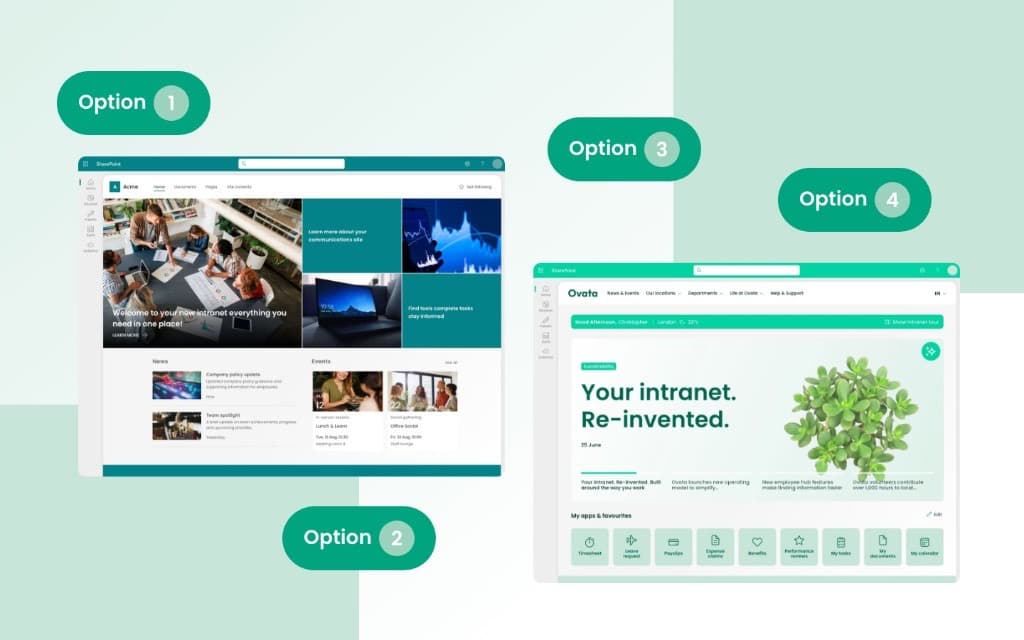
In summary, there are four realistic approaches to building a Microsoft 365 intranet:
- You can use SharePoint Online natively, which works well for smaller organisations with straightforward needs.
- You can extend it with other Microsoft 365 tools like Viva Connections and Teams.
- You can add an in-a-box product that sits on top of SharePoint to provide additional features for communicators, content managers and fill some of the other gaps missing from using native SharePoint.
- You can commission custom development for specific requirements that nothing off the shelf can cover.
Most organisations end up with a blend of two or three of these options, and the right mix depends on your size, your internal capability, and what you need the intranet to actually do.
Why SharePoint is the right starting point
Before getting into the options, it is worth confirming why SharePoint Online is almost always the right foundation for an intranet. The alternatives rarely make sense for organisations already invested in Microsoft 365.
SharePoint Online is included in your Microsoft 365 licence. It integrates natively with Teams, Outlook, Viva Engage, the Power Platform and the rest of the Microsoft stack. It uses Entra ID for single sign-on and identity management, which means your intranet inherits your existing security, compliance, and governance policies. Your data stays within your Microsoft tenant. And with the introduction of Copilot and SharePoint Agents in 2025 and 2026, the platform is becoming significantly more capable; content authoring assistance, AI-powered search, and some governance automation are all landing natively within SharePoint.
SharePoint is a genuinely excellent platform. We have been delivering intranet projects on it for nearly 20 years and we have seen it improve dramatically. The modern page editor is good enough that content editors can build attractive, responsive pages without touching code. The web part library covers most common intranet scenarios. Hub sites and home sites give you a solid information architecture foundation. It is not perfect, but it is absolutely the best base technology for an intranet for any organisation already running Microsoft 365.
However, the real question is whether native SharePoint alone will be suitable for what your organisation and employees need from their intranet.
What are your realistic options?
Across hundreds of SharePoint intranet projects, we have seen every possible combination of tools, products, and custom builds. But they all come back to four core approaches. Here is what each one involves, what it costs in practice, and where it works best.
Option 1: native SharePoint Online

This means using SharePoint Online exactly as it comes, straight out of the box. It uses communication sites, team sites, the standard web parts, modern pages, and the built-in news and content features. There are no additional products, no custom development and no third-party web parts.
When this works well:
- Organisations with fewer than 150-200 employees where the intranet needs are relatively straightforward.
- Teams that have capable SharePoint administrators who can configure sites, manage permissions, and support content editors.
- MVP intranets where the absolute priority is getting something live quickly.
- Environments where IT wants to stay entirely within the standard Microsoft support boundary.
What you should know:
Native SharePoint gives you a reasonable content platform, but it is not an intranet product. There are things that intranet teams and communicators typically need such as mandatory read tracking, content lifecycle management, advanced branding beyond what themes allow, personalised navigation, and comprehensive analytics - SharePoint does not provide these natively.
If your comms team is publishing to 2,000 people and leadership asks "who has actually read this?", then native SharePoint does not have an answer for that. And if you want to have effective content governance to ensure content is up to date and meets required standards across a distributed community of content owners, then SharePoint isn't going to give you that either.
The other thing we see consistently is that organisations which start with native SharePoint alone often end up spending more in the long run. They build workarounds, add manual processes, or eventually bring in additional tools anyway. That is not a reason to avoid starting native - sometimes it is exactly the right approach for where you are today. But it is worth planning for what happens in twelve months when requirements grow.
Option 2: SharePoint Online with Microsoft 365 integrations
This extends the native approach by properly integrating other tools from your Microsoft 365 licence into the intranet experience. Viva Connections (now actually renamed as part of SharePoint) gives your intranet a presence inside Microsoft Teams, including mobile access through the Teams app. Viva Engage (formerly Yammer) adds community discussion and social features. Power Automate handles workflow and approvals. Power BI surfaces reporting and dashboards. Stream manages video content.
It is worth noting that SharePoint's product roadmap assumes that you will integrate these tools, so for example Microsoft won't build a SharePoint feature for groups when Viva Engage does the job well.
When this works well:
- Organisations that are already heavily invested in Microsoft Teams and want the intranet to meet employees where they already work.
- Teams that want to maximise their existing Microsoft 365 investment before adding any additional cost.
- Environments where mobile access for frontline staff is important and those staff already have Microsoft 365 licences.
- Organisations with internal capability to configure Viva Connections dashboards and Power Platform solutions.
What you should know:
This approach is significantly more capable than pure native SharePoint and it is where most organisations should start before deciding whether they need more. Viva Connections is free with your Microsoft 365 subscription and it is straightforward to enable. The intranet experience through Teams is not identical to the browser experience. Some elements work differently and the browser is still superior for certain tasks, but for many employees, accessing the intranet through Teams means they actually use it rather than having to remember to open a separate site.
The limitation is that you are still working within what Microsoft provides out of the box. Viva Connections gives you a dashboard and a feed, not a fully featured intranet management system. Your comms team still cannot schedule content, manage approval workflows for publishing, or easily control what different audiences see beyond basic audience targeting. For smaller organisations this is often fine. For larger organisations, particularly those with dedicated internal communications teams who publish regularly, these limitations start to create real friction.
What about Copilot and SharePoint Agents?
This is the big shift in 2026. Microsoft Copilot is now integrated across the SharePoint experience, assisting with page authoring, content suggestions, and search. SharePoint Agents allow organisations to build scoped AI assistants that can answer questions based on specific content within your intranet. Our observation so far is that many users want to find information in this way, and this has real value.
All this changes the options landscape in a practical way. AI-powered search means employees are more likely to find what they need even if your information architecture is not perfect. Content authoring assistance means your comms team can produce better pages faster. And SharePoint Agents could reduce the need for some custom development by providing intelligent self-service features.
But Copilot requires additional licensing (Microsoft 365 Copilot is not included in standard E3/E5 plans - it is a separate per-user add-on) and SharePoint Agents are still relatively new. They are worth factoring into your planning, but they do not replace the need for a well-structured intranet with good content governance. Ultimately, if you run an agent over content which is out of date, then its answers are going to be out of date too. AI makes a good intranet better, but it does not turn a poorly managed one into a good one.
Option 3: SharePoint Online with an in-a-box product

An in-a-box intranet product is a set of additional features and web parts that sit on top of SharePoint Online and extend what it can do. These features are designed to address the specific needs of intranet teams: better branding, content lifecycle management, enhanced navigation, analytics, mandatory read tracking, news management tools, and the kind of features that internal communicators and HR teams rely on daily.
This is where Lightspeed365 sits. In the interests of transparency: Lightspeed365 is built by Content Formula, a Microsoft 365 consultancy that has been delivering intranet projects since 2005. Content Formula delivers across all four approaches outlined here: native SharePoint, Microsoft 365 integrations, in-a-box, and custom.
We work with organisations across all four options, and will always implement which path(s) work best for your needs. That said, we built Lightspeed365 specifically because we saw the same pattern repeatedly: organisations that needed more than native SharePoint but did not want the cost or complexity of a full platform replacement or extensive custom development.
When this works well:
- Organisations with 150 or more employees where a dedicated comms or intranet team is responsible for content.
- Teams that need features like branded navigation, personalised homepages, content scheduling, mandatory acknowledgements, or proper intranet analytics.
- Environments that want to stay on SharePoint (keeping data in the Microsoft tenant, using existing governance) but need more than what comes natively.
- Organisations that want to be live in weeks rather than months: in-a-box products have significantly shorter implementation timelines than custom builds.
What you should know:
The in-a-box market has changed considerably. Some products that were popular a few years ago such as LiveTiles have either been acquired, pivoted, or lost momentum. We have helped several organisations migrate from these products, including some who moved to Lightspeed365. Other products have grown into full employee experience platforms with pricing to match (Unily, Staffbase, Workvivo).
One key distinction to note is some of these in-a-box products are based on SharePoint and extend its power, and some are standalone and replace SharePoint, although they may offer some integration with Microsoft 365 from the outside. If you want your data to stay in your Microsoft tenant and your intranet to remain SharePoint-native, then a SharePoint in-a-box product is the way to go.
The main trade-off of an in-a-box product is cost. In-a-box products come with a licence fee on top of your Microsoft 365 subscription. For some organisations, this is easy to justify because it unlocks capabilities the comms team needs immediately. For others, particularly smaller organisations, it can feel like paying for the same thing twice. The right answer depends on whether the additional features solve a real problem for you or whether native SharePoint genuinely covers what you need today. An in-a-box product will also generally prove to be far more cost effective than custom development for the same features, or if you have to spend more on administration because of a lack of features. See pricing options →
Option 4: custom-built SharePoint intranet
Custom development means building bespoke web parts, integrations, or applications on top of SharePoint Online using the SharePoint Framework (SPFx), Power Platform, or Azure services. This approach covers requirements that neither native SharePoint nor an in-a-box product can address.
When this works well:
- A specific business process that is unique to your organisation needs to be embedded within the intranet.
- You need integration with a legacy system or line-of-business application that does not have standard connectors.
- Branding or design requirements go beyond what themes and in-a-box products support.
- The previous intranet had custom functionality that needs to be replicated.
What you should know:
Custom development is sometimes exactly the right investment. We have built custom web parts and integrations that transformed how organisations use their intranets, connecting SharePoint to ServiceNow, Oracle HR, Salesforce, and dozens of other systems. When a requirement cannot be met out of the box and it is critical to adoption and business value, custom development can earn its cost many times over.
But custom development comes with technical debt. Every custom component needs maintaining, testing against SharePoint updates, and supporting over time. In 27 years of delivering enterprise solutions, one of the most consistent patterns I have seen is organisations over-customising early and then spending more on maintenance than they saved on the initial build.
The best approach is usually to go as far as you can with native SharePoint and an in-a-box product, and only build custom where there is a clear requirement that nothing else covers.
It is also worth noting that most "custom" intranets are not entirely custom. A typical project might use 80% native SharePoint and in-a-box features, with custom development covering two or three specific requirements. The custom label can be misleading; it does not mean rebuilding everything from scratch.
How to decide: a practical framework
Here is a straightforward way to work out which approach fits your organisation.
Start with three questions:
-
How many employees will use the intranet? Under 150, native SharePoint with Microsoft 365 integrations is genuinely worth trying first. Between 150 and 2,500, an in-a-box product will almost certainly pay for itself in reduced friction and better adoption. Above 2,500, you are likely looking at an in-a-box product plus some custom development for specific enterprise requirements.
-
Do you have a dedicated comms or intranet team? If one person manages the intranet alongside their other responsibilities, keep it simple: native SharePoint or a lightweight in-a-box setup. If you have a dedicated team that publishes regularly, they will need proper content management tools, scheduling, analytics, and audience targeting that go beyond native capabilities.
-
What is your internal SharePoint capability? If you have experienced SharePoint administrators and developers, you can stretch native SharePoint further and handle more complex configurations. If your IT team is stretched and SharePoint is one of many platforms they support, an in-a-box product removes the burden of building and maintaining features that someone else has already built and tested.
These are starting points, not rules. Every organisation is different and most end up with a blend.
What happens if you do nothing?
This is worth addressing because "let's revisit this next quarter" is the most common outcome of intranet discussions. The problem is that doing nothing has a cost.
Content sprawl gets worse every month. Employees stop checking the intranet because they cannot find what they need, so they rely on email and Teams channels instead. Departments and lines of business set up individual SharePoint sites that sit outside the intranet estate. Communications reach drops. New starters have no single place to get oriented. Policy updates get missed. Knowledge lives in people's heads rather than in a system. A collection of out-of-date content builds up which leads to Copilot giving answers which are out of date. And when leadership eventually decides to act, the migration and cleanup effort is significantly larger than it would have been twelve months earlier.
If your current intranet is genuinely working and employees are using it, there is no urgency. But if you are reading this article because you know the current setup is not working, the cost of delay is real even if it is hard to quantify.
Want to know where you stand? If you are trying to work out whether your current Microsoft 365 intranet is keeping up, take the free intranet health check. It takes about ten minutes and gives you a clear picture of where the gaps are. If you then need to get the work funded, the SharePoint intranet business case covers the evidence, benefits and cost lines that survive a finance review.
Ready to talk through your options?
Book a 30-minute intro call with one of our Microsoft 365 intranet specialists, or explore Lightspeed365 to see how we extend SharePoint for organisations that need more.
Need policy compliance on Microsoft 365 too? Xoralia is our SharePoint-native policy management platform - built by the same team, on the same stack.
Frequently asked questions
About the author

Adam Hickman
Microsoft 365 consultant lead
Adam leads the technical design and delivery of Lightspeed365 intranet projects at Content Formula. With 27 years spanning full-stack development, enterprise architecture, and client consultancy across international blue-chip organisations, he makes sure what gets designed actually gets built properly.