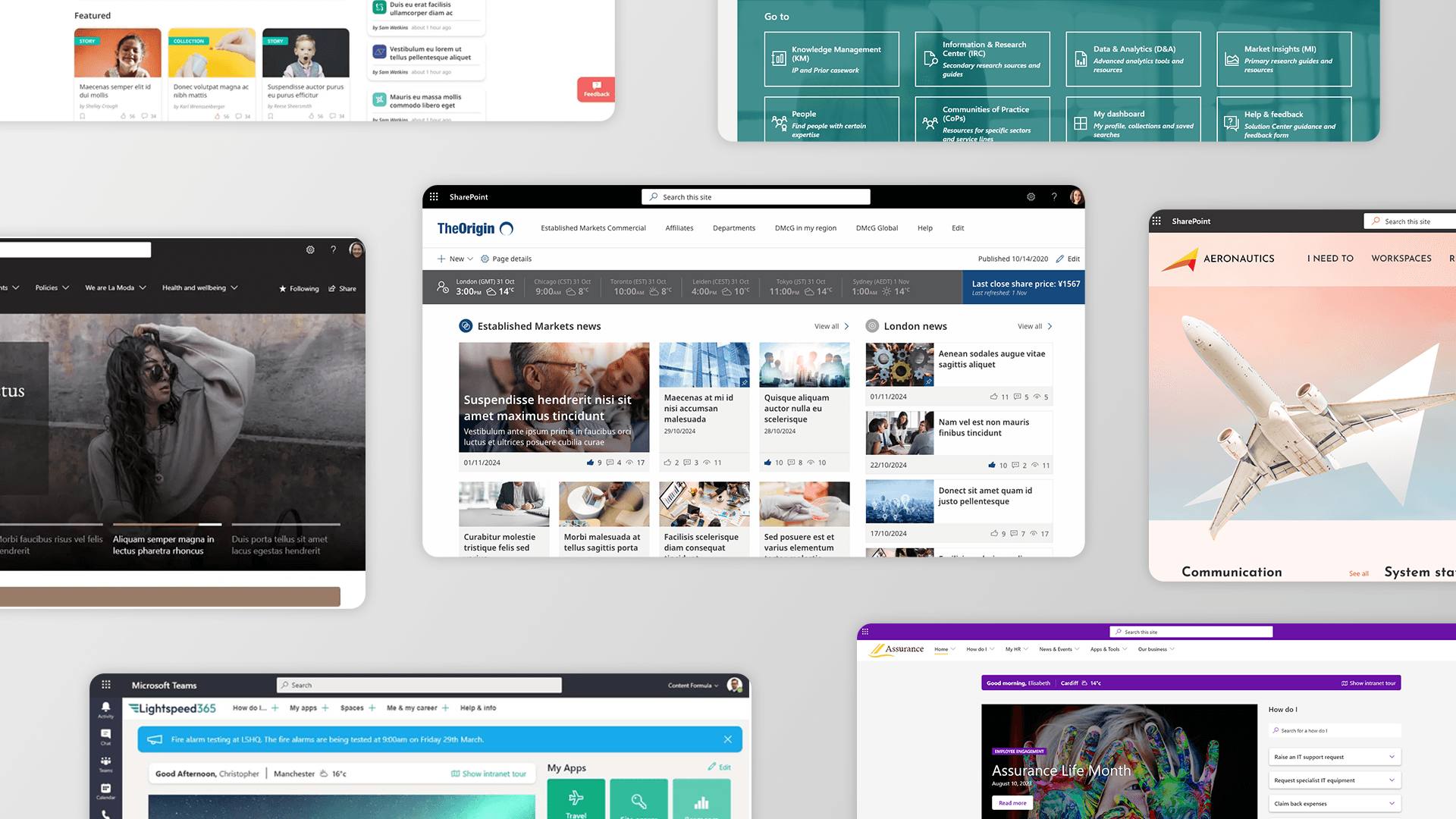
SharePoint intranet homepages come in many forms - and the right design depends on your business's culture, workforce, and goals. This article showcases 12 real SharePoint intranet homepage examples, many of them built or enhanced using Lightspeed365, our SharePoint-native intranet platform. Use them as inspiration to find the design that fits your needs. See Lightspeed365 in 2 minutes →
The 12 homepage types covered are:
- The Balanced Homepage – combines news, tasks, apps and personalised content for large, diverse organisations
- The Knowledge Collection Homepage – prioritises search and findability for professional services and knowledge-heavy firms
- The Daily Work Homepage – acts as a productivity dashboard, surfacing tasks, workspaces, and project sites
- The Social Hub Homepage – community and culture-driven design that brings together social feeds, employee recognition, events, and brand storytelling to foster connection and belonging across the organisation
- The Subject Hub – a focused landing page for campaigns, strategic themes, or departmental topics
- The GTD (Getting Things Done) Homepage – streamlines task completion with “How Do I” guides and service integrations
- The News Centre Homepage – built for enterprise internal communications teams managing multiple locations
- The Community Hub – culture-led design integrating social feeds, events, and brand storytelling
- The Field Worker Homepage – mobile-optimised with role-based app launchers for frontline and deskless workers
- The Dashboard Homepage – real-time milestones, task lists, and search tools for fast-moving teams
- The Heavily-Branded Intranet Homepage – When your SharePoint intranet needs to look like your customer-facing website
- The AI-Augmented Intranet Homepage – Surfacing AI-assisted search in a user-friendly way for improved self-service
Choosing the right design starts with understanding your intranet strategy: what problems are you solving, who are your users, and what behaviours do you want to drive? From there, SharePoint’s flexibility – extended by Lightspeed365 – means virtually any homepage experience is achievable.
How does your intranet compare to these examples?
A modern homepage can re-energize your communications and get employees involved. Do you want to focus on engaged employees? Or an informed workforce?
Take our Intranet Health Check to see where you can improve your intranet.
The balanced intranet homepage
Serves news, tasks, tools in one place.

This intranet balances communication with day-to-day utility
Your intranet should keep people informed and help them get work done. A balanced intranet homepage provides an overview to reflect these multiple activities with a different web parts and features – supporting internal communications, improving productivity, driving collaboration and helping employees complete tasks. Large, global and complex businesses tend to adopt this kind of balanced homepage, helping a diverse workforce to stay informed, get things done, be engaged and find what they need.
In this example:
- A personalised greeting helps make the intranet feel less corporate, and also indicates it is a personalised experience.
- The news is displayed prominently to support internal communications, with an alert at the top for immediate operational or urgent messages.
- The My Apps area provides a personalised launch pad to key apps and tools, to help employees complete their day-to-day work and drive productivity.
- Tasks are highlighted in the dashboard section to help employees get things done, in this case leveraging the Viva Connection dashboard feature.
- A middle panel provides a personalised overview of key tasks that employees need to complete, including relating to individual and team learning, as well as policies that must be read. Typically a feature like this could involve integrations with SharePoint-based solutions including policy management software such as Xoralia, or a Learning Management System like Learn365 from Zensai.
- A “My news” area presents personalised news relevant to the individual, which is important for intranet adoption and valuable in highly diverse workforces.
- Collaboration, discussion and dialogue is supported by the “Engage” panel which highlights activity within Viva Engage groups.
Employees seeing real-time news updates and tasks has been shown to double page views and time spent on the intranet.
Want to see more homepage designs? Browse our design gallery → or watch how to design an engaging intranet homepage →
The knowledge collection intranet homepage
Make knowledge easy to find, share, and trust - without overwhelming your users.

A smart, searchable homepage that connects employees to the knowledge they need—personalised, filterable, and easy to maintain.
Intranets have proved to be adept at housing valuable reference information, the “one source of truth”. This means intranets are often a key channel in supporting knowledge management and can act as an effective knowledge base for corporate or organisational knowledge. Typically, this kind of approach might be adopted by a professional services, consulting or engineering firm. A knowledge collection intranet homepage encourages findability through search but also in encouraging links to resources.
In this example:
- A prominent search box allows and encourages users to search for documents and through knowledge collections, with the potential ability to filter items on areas such as project type and country, using metadata based on the company’s taxonomy. There’s a link to a more advanced search for convenience.
- A “go to” section provides links to key knowledge collections or resources by topic, providing an opportunity to discover knowledge items or to find what someone needs through browsing.
- A significant proportion of the homepage is dedicated to personalised access to knowledge, including collections of knowledge, previous searches, personalised recommendations of knowledge (potentially based on role, preferences and previous searches), as well as curated sets of resources.
- Calls to action encourage users to add knowledge to the collection as well as share useful feedback for improvement.
If people can’t find it, it doesn’t exist. This homepage makes sure knowledge gets used—not buried.
The daily work intranet homepage
Turn your homepage into a daily launchpad, not just a noticeboard.

A personalised dashboard that brings tasks, tools, and updates together—so employees start every day in the right place.
Intranets can act as a central point for employees to keep on top of all their daily work and support them in their role. In this “daily work” intranet, the homepage acts more as a dashboard, providing access to project sites and workspaces where employees carry out their day-to-day, as well as helping employees keeping on top of their priority tasks. In this way, the intranet becomes a dynamic channel that supports employee productivity.
In this example:
- There is a custom-built system status web part giving RAG (Red Amber Green) status updates on key software platforms, with the ability to drill into more detail.
- A personalised feed from Viva Engage surfaces the latest conversations that are going across different working groups or communities.
A personalised “My Workspaces” area links through to the SharePoint team sites or even Microsoft Teams spaces where collaborative work is carried out on different projects.
When the homepage becomes the place work starts, your intranet stops being ignored.
See how businesses like these built their intranets in practice → Read our case studies
The social hub intranet homepage
Surface real voices and interactions that drive engagement and connection.
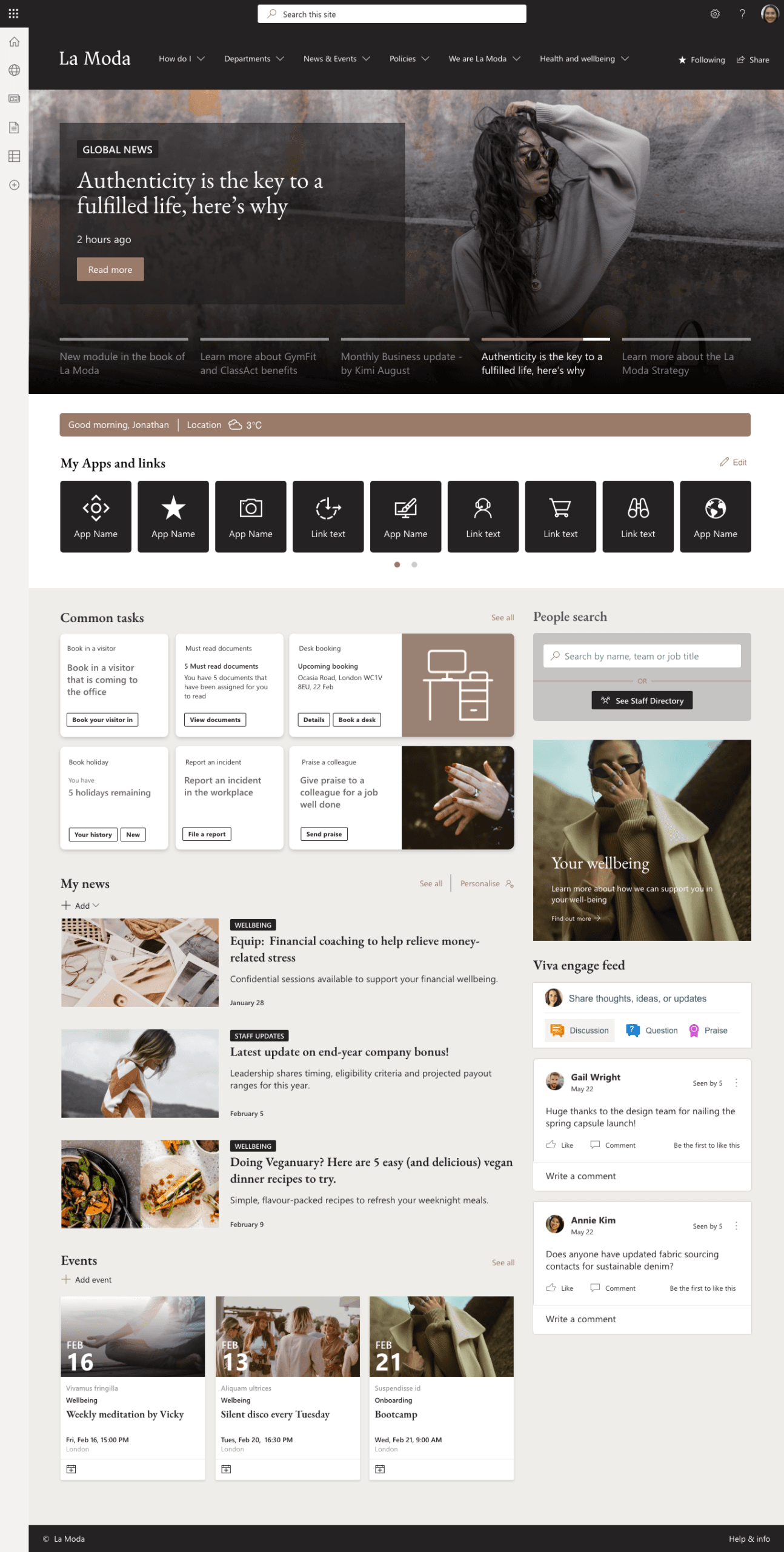
Viva Engage conversations, comments, and likes—all pulled into the homepage.
Some “social” intranets are more focused on supporting community and connection between employees, facilitating conversations, dialogue, interaction and even collaboration. A social intranet hub homepage helps to surface both internal and external conversations, bringing together discussions, updates. and events. It also seeks to help employees feel more connected to a brand. Typically, a social hub intranet might be used by companies where employee engagement is high on the agenda, for example in a media or retail company.
In this example:
- The intranet page has a distinctive look and feel and uses highly attractive imagery, aligning with the organisation’s brand and helping employees to connect to it.
- Events are also prominently displayed, encouraging registrations, and again stressing participation.
- News and promoted content is presented in an eye-catching way in the hero.
- Internal conversations from Viva Engage, the company’s social collaboration platform of choice, are highlighted within the “Conversations” section. The feed can be targeted to different groups for relevance.
- Updates from the company’s external social channels are also relayed, providing information on how the organisation goes to market and interacts with customers.
- Press and media updates are also given, again providing a balance to internal and external social media feeds.
Employee voice doesn’t live in Teams chat—it belongs on the homepage too.
The subject hub intranet homepage or landing page
Focus attention and drive engagement around key topics, initiatives, or themes.

A structured hub for campaigns, themes, or knowledge areas—designed to drive visibility and clarity.
In practice intranets tend to be made up of a number of different sites, often maintained by the relevant teams and groups within an organisation, all tied together by an overall homepage, navigation and search. Sometimes sites within a wide intranet can be dedicated to a particular department and team, while others act as a place to access resources on a particular topic. This screenshot shows a potential subject or topic hub – in this case about patient wellbeing.
In this example:
- A visually striking carousel links through to headline content, prominent reference information and major updates about the subject in question.
- Featured resources including story updates and knowledge collections on the topic, with indicators of the number of likes and comments to reflect their popularity.
- A noticeboard feature presents the latest subject-specific quick updates, aggregated from different sites across the intranet. The most viewed and downloaded items are also displayed, to drive engagement.
“Show more” and “View more” buttons allow the user to view more content, ensuring the initial homepage experience remains focused and uncluttered.
When you need everyone to focus on strategic imperatives—this is the page that gets it done.
The GTD (Getting things done) intranet homepage
Put HR, IT, and internal services at employees’ fingertips.

Triage-style navigation that gets people to the help they need, fast.
A key function of a good intranet is to help employees get things done efficiently and in the right way, supporting productivity and saving time. The GTD intranet homepage focuses on task completion, making the intranet the go-to place to complete simple tasks, and also a valuable asset that supports increased productivity.
In this example:
- A welcome bar at the top includes a link to an intranet tour which automatically loads when an employee first visits the intranet, and walks users through the main intranet features and the information that can be found.
- The homepage leverages the Viva Connections dashboard to deliver a common tasks panel to highlight common tasks such as logging an IT ticket, and to highlight key activity; integrations with common enterprise systems often means that employees don’t actually need to visit these applications if just needed to view data or perform simple transactions.
- A searchable database of “How Do I” information provides succinct information on how to get things done across a wide variety of topics, helping to streamline and standardise processes and supporting productivity.
- “How Do I” information is also targeted based on an employee’s profile, so for example a person sees the right process information based on their location.
- Personalised links to relevant pages also mean employees can reach the apps, sites or pages they frequently need to access or refer to in getting things done.
- A handy people search allows a quick search of employee profiles to help contact the right person which is often necessary for task completion.
- Other features such as news and events also ensure the intranet continues to keep people informed and supports engagement too.
Stop making people guess where to go. Let the homepage guide them.
The News Centre intranet homepage
Give comms teams a flexible space to plan, publish, and measure their content.

A central hub for campaigns, updates, targeting, and feedback.
Keeping employees informed and supporting internal communications is one of the most important roles for an intranet; in fact, many intranets are owned by the internal comms function. The News Centre intranet homepage keeps employees informed by providing news updates from right across the organisation – often personalised to different groups. The News Centre intranet has particular value in larger global businesses with multiple locations and diverse workforces.
In this example:
- The header displays local weather, the stock price but also the local time across a number of key locations – this is not only useful in helping contact colleagues in a different time zone, but also makes the page feel a little like a global newsroom where there is always something happening.
- There is major news from across markets with also a primary news item. In the layout on this page there are more news items than on homepages which tend to be dominated by a carousel, and where items can sometimes get lost.
- Engagement data such as views, comments and reactions indicate the most popular items.
- A separate feed of London news is personalised to the location of the user based on their profile or their preferences – this could potentially say New York, Frankfurt, Mumbai or elsewhere.
- A special area for operational announcements is also shown under the news – again this might be for an item such as an unexpected IT outage and could be targeted, for example saying that there will be fire alarm for a particular office.
- The news centre is also balanced by more “How to” and operational-related content in the lower half of the homepage, including a database of “I need to” information on how to complete key tasks, as well as links to apps and resources.
An intranet homepage built for enterprise comms across all functions and locations.
The community hub
Showcase your culture, amplify stories, and help employees feel seen.

A vibrant homepage that celebrates people, not just processes.
Tailored for the media or marketing sectors, this SharePoint site example integrates external and internal social feeds. The large news carousel and social media feeds make it a vibrant SharePoint website example that actively engages users.
- A large news carousel at the top gives plenty of room for rich imagery and showcasing the company’s brand and products.
- A stock price widget is neatly integrated inside of the news carousel to as not to constrain impact of the look-and-feel.
- The events feed is a standard SharePoint feature, but brought to life by the playful iconography and colour selection.
- A large proportion of the homepage is then given to a feed of content from the companies external social media feeds – making a point that what the organisation says to those outside is just as relevant to those inside.
People connect with people—this homepage makes that the point.
The field worker
Give frontline teams fast, mobile access to tools, comms, and updates—wherever they are.

A mobile-optimised homepage with role-based access to apps, info, and search—tailored for frontline use.
Optimised for use in the field with tablets and smartphones, this SharePoint intranet design is practical and accessible, making it perfect for industries like construction or field services.
- The icon based app launcher dominates the homepage experience, but avoids being cumbersome by including a contextual quick search feature – similar to that found on smartphones.
- The apps and services presented to the employee are targeted based on their role.
- Employees can also customise the launcher, just as they would customise the homescreen on their phone or tablet.
Not every employee works at a desk—this homepage makes sure they’re not left out.
The dashboard
Bring together real-time updates, tools, and tasks in one focused, high-utility homepage.

A dynamic homepage with milestones, search tools, and personal task lists—designed for fast-moving teams.
A real-time information hub featuring tools like countdown clocks and milestone trackers. This SharePoint intranet example is ideal for fast-paced environments, providing quick access to essential functions and tools.
- More traditional fare of global news and personalised quick links are still a feature.
- But as we go down the page we see personalisation features like the welcome bar.
- And various search tools which not only cover colleagues and ‘how do I’ guidance, but also a ‘parts finder’ – something more specific to the needs of this particular organisation.
- A milestones dashboard gives a snapshot of where the company sits with current deliveries.
- And a task list acts as a mini to-do for each employee, nestled conveniently alongside the other information.
When everything’s changing fast, this homepage keeps people on track.
The Heavily-Branded intranet homepage
When your SharePoint intranet needs to look like your customer-facing website.

- A heavily-branded intranet treats your internal digital experience with the same creative ambition as your public website – using your full brand palette, typography, imagery, and tone of voice throughout.
- Brand alignment signals to employees that what happens inside the organisation matters just as much as what the world sees outside – reinforcing pride, purpose, and belonging.
- When an intranet looks and feels like a trusted, polished product, employees are more likely to trust the content it contains – poor visual design creates unconscious doubt, while strong design builds credibility.
- A brand-consistent intranet also reduces the cognitive gap between internal and external communications, making it easier for employees to act as confident brand ambassadors.
- Lightspeed365 makes heavy branding achievable in SharePoint Online without custom development – giving comms and brand teams control over colour, layout, imagery, and typography at scale.
The AI-Augmented intranet homepage
Surfacing AI-assisted search in a user-friendly way for improved self-service.

- The AI-augmented homepage places a conversational agent window front and centre, allowing employees to ask questions in plain language and receive instant, accurate answers sourced directly from intranet content
- Unlike a generic AI chatbot, this agent is scoped exclusively to your intranet – so every answer it gives is grounded in your organisation’s own policies, guides, news, and resources
- The agent is trained on your most common employee queries, meaning it proactively suggests relevant topics and anticipates what people are likely to need before they even finish typing
- This dramatically reduces the burden on HR, IT, and communications teams by deflecting repetitive questions to a self-service experience that’s available 24/7
- The result is an intranet homepage that doesn’t just display information – it actively helps employees find the right answer, first time, without needing to know where to look
FAQs
How do I work out which SharePoint intranet site design is right for me?
One of the great things about a SharePoint intranet is that there are many different features and web parts too add, most of which have their own configuration options; this means you have a lot of flexibility in terms of how you structure and design your homepage. Hopefully this article will have given you some inspiration!
However, having a lot of choice also means it can be difficult to know where to start. So, if you are working out which SharePoint intranet site design is right for you there are certain steps you can take. The first group of steps is around defining your strategy and requirements, while the second group of steps is finding the specific design that meets those requirements.
How do I work out intranet requirements to inform the homepage design?
Your intranet strategy and requirements will have a significant influence on our homepage design:
- First, you need to understand the problems the intranet is trying to solve. Undertaking user research and stakeholder research through interviews, workshops, and surveys will help you understand user and stakeholder needs and ensure you avoid building an intranet based on assumptions.
- Our free intranet health check assessment tool is also a great starting point to consider what is missing from your current intranet.
- From your research, work out the kind of requirements and features that will help solve pain points and also underpin adoption. Do employees need to access news, everyday apps, knowledge, search, or something else? Some of these features will almost certainly be what you need to include on your homepage.
- Ensure your intranet fits your culture and is also aligned with your organisational strategy. For example, are you trying to create a more social and community-focused intranet, a hub for internal comms, something supporting the completion of employee tasks, or something different?
How do I go about designing a SharePoint intranet homepage?
- Once you have got your strategy, try to design a homepage that helps deliver that strategy through its features. Look for inspiration through pages like this and also use the Microsoft LookBook which is chock full of further designs.
- Sometimes it might be that there are gaps in your SharePoint intranet homepage design. For example, using Lightspeed365 features will fill many of the essential homepage features you may need but are not available out of the box with SharePoint.
- Create some mock-ups and road test them with actual users. What do they think? Make some iterations based on user feedback. Consider creating some clickable prototypes to get richer reactions to your proposed design. Finally settle on a final design which has been actually approved and tested by users, while also validating it is technically possible to create the design. Over the years, at Content Formula we’ve supported many clients with this process.
How long does it take to build a SharePoint intranet?
A basic SharePoint intranet can be launched in a matter of weeks using templates and tools like Lightspeed365. A fully custom-designed intranet with bespoke branding, integrations, and governance typically takes between 2 and 6 months depending on organisational complexity.
Can SharePoint intranets work for frontline and deskless workers?
Yes. SharePoint Online is fully mobile-responsive and can be configured with role-based homepages that surface the apps, links, and information most relevant to field workers. A dedicated Field Worker Homepage design prioritises mobile usability and fast access to shift tools and HR resources.
Recommended video guides:
How to create SharePoint intranet templates
10 example templates for SharePoint intranets
Building the right intranet homepage for you
We hope these examples have given you a bit of inspiration! The combination of SharePoint web parts available out of the box and additional Lightspeed365 web parts means that you can build the right homepage that meets your organisational needs and culture, and highlights the main functions of your intranet.
If you’d like to discuss your intranet project or how Lightspeed365 intranet could add value to your intranet, then get in touch!
For more inspiration, be sure to check out our SharePoint intranet playlist on YouTube.
About the author

John Scott
UX director and Lightspeed365 product owner
20 years designing and delivering digital workplace solutions for enterprise and professional services organisations. Has led multiple projects integrating AI for intelligent search and data classification, with a UX-led focus on making those tools intuitive and adoptable for everyday employees.